Articles by "Cracked APPS"

 This 100% tested and free tool works with Miracle Box v3.40 setup and Loder. Easily unlock latest security in one click, remove all locks, easy frp/Bypass and password, read this tool.


Features of Miracle Digital Free Tool V3.40

Features Of Miracle Tool

Miracle Box is a comprehensive tool that is used for servicing mobile devices and it has the following features:

  1. Flashing firmware: Miracle Box allows users to flash firmware on Mediatek (MTK) and Qualcomm devices.
  2. IMEI repair: It provides the ability to repair IMEI numbers on supported devices.
  3. Unlocking bootloaders: The tool can unlock bootloaders on Android devices.
  4. Rooting: Miracle Box can root Android devices.
  5. Formatting: The tool has the capability to format mobile devices.
  6. Read and write option: Miracle Box provides options for reading and writing data to the device.
  7. Network repair: The tool can repair network connectivity issues on mobile devices.
  8. Clear password: Miracle Box allows for direct password clearing.
  9. Private code clearing: It can also clear private codes on devices.
  10. User lock reset: The tool provides the ability to reset user locks on supported devices.  


    This 100% tested and free tool works with Miracle Box v3.40 setup and Loder. Easily unlock latest security in one click, remove all locks, easy frp/Bypass and password, read this tool.

Miracle Digital Free Tool use this tool without internet, without activation When this software tool was initially created it was mainly designed for keyboard mobiles and anyway touch mobiles were not yet in the market so China was kind and launched cheap touchscreen mobiles. The creators of the software tool made some changes in this tool and also put the files of the touch mobile and gradually new mobiles came in the market and there were changes in this software tool and today there has so many changes in this software tool. And the extras will add that now you can unlock any mobile using this software tool, it has become the most used software tool at present.


Free Miracle Digital Tool V3.40 Download


Miracle Digital Free Tool is a great tool and works best. Miracle Digital Free Tool v3.40 is the best tool and 100% tested easy unlocker. You must have used a lot ofwnload All needed files from here tools, once you try this software tool, you will not find a better software tool than this one and the good thing is that you get it for free. And anyway, there is a saying that you must have heard that when something is available for free, you should not pass it up, so this tool is pretty awesome and you need this software tool. Must download.

Download  miracle box All needed files from here

How to install:

1. Setup
2. Copy all update v3.40 to location install miracle (C:\Miracle Team\Miracle Thunder) default
3. Run MIR.bat ( if not working, manually copy hots to C:\Windows\System32\Drivers\etc\hosts)
4. Open Miracle 😍

Username: MIR202211210030
Password: 12345678


Frp Apps mymobitips Free Download frp bypass


All Android FRP Bypass App Download

 
Android 5 Google Account Manager Download

 
Android 6 Google Account Manager Download

 
Android 7,8,9,10 Nougat Lounchar Download

 
Quikshortcut Maker App free Download  Download 2


Android Louncher Settings App Download

Android Settings Open Downlod

Samsung Galaxy App Store Open
 

Android 7,android 8,Android 9 Android 10 FRP Patch App Download  Download 2

 FRP lock has become a big deal for all Android devices, if you forgot your Google account id / password or bought a used mobile, it is important to know how to bypass a Google account. Below, you can download FRP Tools Free which can help you bypass Google account verification process easily. There are alternative ways to bypass FRP, some work and some no longer work.


If you want all FRP Bypass Tools that can help you easily bypass Google Account then you have come to the right place.All FRP Tools are tested and updated for Google Verification Bypass process.


You can easily bypass factory reset protection using our FREE unlocking service through this time saving FRP apk and FRP bypass tool, so if you are learning how to use this tool, FRP apk & tool is looking for your device on the site, and if you can't find your device, comment below and I'll try to answer all questions ASAP.


When you added Google account on your Android phone, you automatically turn on FRP protection, so due to large number of FRP issues, frpbypass.net helps you find the quick solution to bypass FRP and remove Google account from your smartphone with a very easy way.


Download Google Account Manager


Download Bypass FRP APK Tools


Download Bypass FRP PC Tools


Download all Box Free Version Tools

Do Not Require A Box or Dongle


 Halabtech Tool is a free Android tool which helps developers to work and manage most of Android smartphones with ease, with Halabtech Tool you can read full device information, remove FRP from Samsung devices, enter phone to download mode or recovery, add many languages without root, remove screen lock with or without root, fix IMEI, fix Sn, reset efs, fix DRK, open bootloader, enable ADB for Huawei devices ...


Download Halabtech Tool

Here you can download Halabtech Tool for Android device. We have also listed the supported devices that work well with this Halabtech tool.

File name: Halabtech Tool.exe
Supported Operating System: Windows XP, Windows 7, Windows 8, Windows 8.1, Windows 10

Download Halabtech Tool: Halabtech Tool-v0.9 — Latest


How to Install Halabtech Tool

NOTICE: MAKE SURE YOU’VE ALREADY TURN OFF YOUR ANTIVIRUS SOFTWARE, OTHERWISE, YOU WON’T BE ABLE TO USE Halabtech Tool.

1- Run Halabtech Tool-v0.9final.exe and click Next.


2- Check Create desktop icon and click Next.

3- If the Error Message appears click on Ignore.
4- Check Launch Halabtech Tool-v0.9 then click on Finish.

How to use Halabtech Tool

  • SAMSUNG
    • Main
      • Read Info ll Active lang (No Root)
      • Reset Frp ADB ll Frp ADB(mth2) ll add Arabic 6.X-7.XX-8.X. X(No Root)
      • Remove Samsung account ll Enable ALL lang (Root)
      • Reboot To Normal Mode ll Reset lock (Root)
      • reboot to download mode ll Reset lock Halab tech device
      • Reboot To Recovery Mode ll Remove security notice (No Root)
      • Fix flash error ll Enable Mobile Data icon (No Root)
      • Erase FRP lock ll Remove Lock screen by ADB (No Root)
      • Erase FRP lock 2 ll Delete security notice (Root)
      • Read Info ll Run service (Root)
      • call to 111  ll factory Reset
      • reboot to download mode


  • SAMSUNG
    • Repair
      • Repair SN(root)
      • Disable factory mode(root)
      • S-Health Knox Fix(root)
      • RESET EFS
      • Fix IMEI null(baseband unknown)
      • Active diag
      • SPD: Repair IMEI / Repair Network
      • Exynos: Read EFS / Wipe EFS.
      • Qualcomm: Read EFS / Wipe EFS / Restore Original IMEI.


  • SAMSUNG
    • Screen Lock
      • Remove systemui
      • Remove Lock


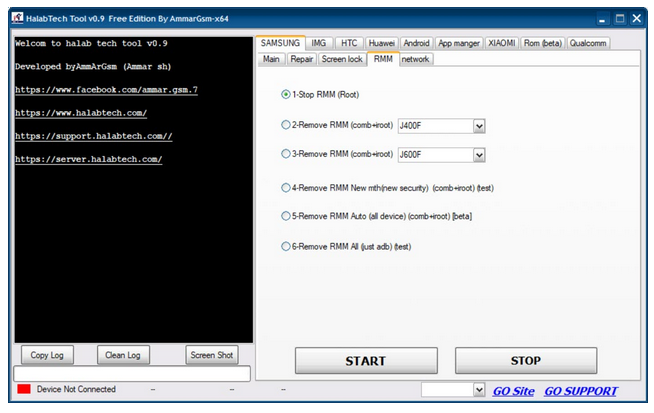
  • SAMSUNG
    • RMM
      • Stop RMM (Root)
      • Remove RMM (combination + Root)
      • Remove RMM (combination + Root)
      • Remove RMM New method (new security) (combination + Root) (test)
      • emove RMM Auto (all device) (combination + Root) [beta]
      • Remove RMM All (just ADB) (test)


  • SAMSUNG
    • Network
      • Flash Modem File all device.


  • IMG
    • Make recovery remove lock (DEL UI) ll Make recovery remove lock (NO DEL UI)
    • For Android 7.0 & 8.0: Make recovery remove lock ll Make recovery Fix.
    • For Android 7.0 only: Make recovery remove lock ll Make recovery Fix.


  • HTC
    • ADB Mode
      • Read Info ll Active lang (no root)
      • Reset Frp ADB
      • Reboot To Normal Mode
      • Reboot to fastboot mode
      • Reboot To Recovery Mode
    • FastBoot Mode
      • Read Info ll Get Token ll Reboot Bootloader
      • Reboot RUU ll Relock Bootloader ll Reboot Fastboot(Non-ADB)
      • FRP FASTBOOT ll Reboot Normal(OS) ll Reboot Download Mode
      • Write IMEI
      • Unlock Bootloader ll Flash Rom ZIP
      • Flash Recovery ll Flash Boot ll Flash System ll Flash Userdata.


  • Huawei
    • Normal Mode – ADB Mode
      • Read Info ll Active lang (no root)
      • Reset Frp ADB ll Enable all lang (root)
      • Reboot To Normal Mode
      • Reboot to fastboot mode
      • Reboot To Recovery Mode
      • Remove DEMO (no root)
      • Patch ROOT Android 9
    • FastBoot Mode
      • Read Info ll Get Token ll Reboot Fastboot(Non-ADB)
      • Relock Bootloader ll Unlock Bootloader
      • FRP FASTBOOT ll Read Info build Number
      • Check Bootloader state ll Reset FRP by code
      • Write Root.
      • Flash Recovery.


  • Android
    • ADB
      • Read Info ll active lang (No Root)
      • Reset Frp ADB ll add Arabic 6.X-7.XX-8.X. X(No Root)
      • Micromax Frp ADB Mode ll install more Locale and active it
      • Frp ADB (Method2)
      • Reboot to download mode ll Reset lock (root)
      • Reboot To Recovery Mode ll Remove Lock screen by ADB (No Root)
      • Reboot To Normal Mode ll Factory reset
      • Install MagiskManagerv7.2.0
      • Install Apk.


  • Android
    • ADB
      • Read Info ll Reboot Bootloader
      • ReIock Bootloader ll Reboot EDL
      • FRP Fastboot Method 1 ll Wipe Data /Cache
      • Remove Spd Frp ll Wipe Data
      • Remove Qualcomm FRP
      • Remove Xiaomi FRP
      • Remove Lenevo FRP
      • Remove Moto FRP
      • Remove YUFORIA FRP


Miracle Box Latest Setup V2.82 already cracked(2019) Free Download

Miracle Box is all-in-one servicing solution specially designed to work with a wide range of Chinese mobile phones *. Miracle Box allows its owner to perform phone flashing and mobile unlocking procedures as well as other software repair operations with devices based on supported CPUs.


Miracle Box Thunder Edition Features:

  • Unlock FRP Lock.
  • Unlock Pattern Lock.
  • Unlock Boot-loader.
  • Read and write flash.
  • Unlock Pin.
  • Unlock Password.
  • Unlock FingerPrint.
  • Read and write NV.
  • Read & Write partition.
  • Auto Device detection.
  • Read info.
  • Write dump.
  • Factory Reset.
  • Remove all security.


   Miracle Box - Supported CPUs:


  • SPD
  • CoolSand
  • MTK
  • MSTAR


Supported OS For Miracle Box Thunder Edition:

  • Windows XP
  • Windows Vista
  • Windows 7 (32 Bit / 64 Bit)
  • Windows 8 (32 Bit / 64 Bit)
  • Windows 10 (32 Bit / 64 Bit)

  •  download Miracle Box latest version already cracked for free
  • how to install Miracle Box latest version already cracked for free

WhatsApp is the top choice when it comes to messaging apps. It allows you to message anyone for free, and you need your phone number to sign up. But for all the versatility and reach, there are still things that it lacks. Precisely, it lacks the kind of customization that a lot of users want.
This has given rise to an alternative called GBWhatsApp. Developed by GBMods, it is based on WhatsApp Plus – a mod that allows users to customize WhatsApp regarding features and appearance.
 Features of GBWhatsApp
Contrary to the limited sets of features offered by WhatsApp, its modded alternative GBWhatsApp has a range of attributes, some of which are discussed below.
GBWhatsApp lets users create dual Whatsapp accounts and open them simultaneously or quickly switch from one to other. Statuses can be set to 250 characters while group names can be set to 35 characters. It allows users to broadcast messages to 600 people. One can send 50 images, 100 documents, and videos up to 30mb in one go. Privacy is given utmost priority as users can hide last seen on DMs, disable calls for specific contacts, hide second tick as well as blue tick and add a lock to the account without third-party software.
The latest update even supports different languages, has an auto-reply feature and comes with a DND mode that severs the internet connection to the GBWhatsApp application. It is also possible to customize some elements using GBWhatsApp like widgets, conversation Screen, open log, popup notification, and chat screen.
How to Download and Install GBWhatsApp?
The steps to get started with GBWhatsApp are fairly simple. Begin by downloading the latest APK version (v7.70) by FouADMods. Next, go to Settings, choose “Security” and click on “Unlocknown sources.” Once that’s done, click on the file you’ve downloaded and followed the on-screen instructions to install GBWhatsApp.
When the installation is complete, you will then be asked to enter a mobile number, which will be verified via an OTP code sent through SMS. Just enter the code, and you’re all set. After installation, you can easily migrate all your WhatsApp activities to GBWhatsApp right away.

WhatsApp has had several updates recently, one of which has imposed a limit on the transfer of messages to stem the phenomenon of fake news sharing and hate messages. It is now also possible to play videos directly in conversations with the arrival of a Picture-in-Picture mode.


WhatsApp is regularly accused of participating in the spread of fake news and hate speech. The developers of the instant messaging application had to adapt and had already limit the transfer of a message to 20 contacts on WhatsApp. This figure had even been reduced to 5 for India, the most problematic country in which message chains led to the lynching and death of several people. Well this limit of 5 is now active for everyone. Users can no longer relay the same message to more contacts or groups. A feature that most people have little use and which serves in particular to mass sharing information too often wrong.

WhatsApp integrates a Picture-in-Picture mode for video playback


Another feature that has landed recently on WhatsApp and you may have already for a few days, a Picture-in-Picture mode for playing videos. It mainly allows you to watch YouTube videos directly from the chat, while a click on such a link sent back to the YouTube app in the past. It is also possible to play the video and continue reading the conversation at the same time. On the other hand, you have to stay in the chat in which the link was shared, it is not possible to use this mode while wandering in the rest of the app.

Among the next options that should appear on the app soon, WhatsApp could as Snapchat allow to send messages that disappear after reading. The ability to respond privately to a message from a person in a group should also happen. In the meantime, to benefit from the latest added features, you can manually download WhatsApp via the link below.

Download the APK of the latest version of WhatsApp Messenger

This app can create a shortcut to an application from the list of activities which are installed on your phone.
Even if so many applications are installed, you can choose an activity smoothly.

You can also use the QuickShortcutMaker for searching the app which you want to launch.
If you want to use the app which you don't use frequently, maybe you have no shortcuts for it. So, you may have to search the app from a list of many apps. Even if you know the name of the app, it's hard to find it.
In this situation, the QuickShortcutMaker will help you finding the app. Please try!


This may be useful. But please use it at your own risk!
You can make shortcuts to hidden setting screens which are usually not accessible.
Even if you encountered any problems using this app or shortcuts created by this app, I don't have any responsibility about that. Please be sure to use this app at your own risk.


About Internet access permission:
From the version 2.0.1, for a more rapid improvement of the app, you will be requested an additional permission to access network so that the app can send a detailed error report to developer.
The app uses network only to send error reports.
And when it communicates, a confirmation message will be displayed, so please rest assured.


for Launcher3 of Cyanogenmod
If you cannot create shortcut, please try the following steps:
1. Long-tap the home screen.
2. Tap "WIDGETS".
3. Long-tap "Activities" which has the QuickShortcutMaker's icon.
4. Drag it to somewhere on the screen.
5. QuickShortcutMaker will be launched.
6. Select an activity, edit it, and tap "Create".
7. A shortcut will be created on the home screen.

Follow the updates
Google+
https://plus.google.com/u/0/114542232871046503427
Twitter
https://twitter.com/sika_app

Recent updates:
(v2.4.0)
- Added Italian and Arabic translations.
- Adapted to AndroidPhone7 theme.
- Changed dialog UI.
- Fixed a bug that the shortcut for Google Play cannot be opened.
- Added function to ask you to rate this app. (Forgive me if you don't like such a thing.)
(v2.3.0)
- Added translations to many languages. (Français, Español, Português, Polski, 한국어, 中文(简体), 中文(繁體), Bahasa Indonesia)
- Added support for some other themes. (Atom / Solo, etc.)
- Added several other improvements.

(v2.2.0)
- It is now possible to operate multiple items from the activity list by long-tapping the items. You can add them to favorites or share.
- Changed the text format in which to share the application information.
- Added the types of themes that can be selected icon (ADW / Nova / Apex / LauncherPro / GO / Holo).
- Added the number of icons in the list of themes.
- Changed the UI of shortcut editing screen.
- Added German translation.
- Added a lot of improvements.
(v2.1.0)
- Added support for tablet devices.
- Added function to share app information as text.
- Improved UI of some screens.
- Fixed some bugs.
(v2.0.3)
- Added function to open the App info screen from the shortcut editing screen. (Android 2.3 or later only)
- Fixed a minor bug and UI.
(v2.0.2)
- Fixed a bug that the app crashes while searching at a certain condition.
(v2.0.1)
- Added error report function to send detailed information when the app crashes or when you see "Failed to load" message.
- Reduced consumption of the memory so that the models which have low-memory not to crash.
- Search results can be sorted order by names.
- Increased speed of search.
- Fixed a bug on setting icon.
- Fixed a bug that the icon becomes smaller when you use the app on tablets.
(v2.0.0)
- Added history and favorite features.
- Applied Android 4.0(ICS) UI style.
- Activity list is now grouped by app.
- Fixed some bugs.

DOWNLOADS:
Quickshortcut maker apk
- From here

Tecnocare FRP
- From here

Apax Launcher
- From here


am sharing a tutorial in this post to download Z3X Samsung tool pro 29.5 with loader full Activation. The downloaded file will help you to run the tool and use it for the Samsung phones. Get z3x samsung tool pro latest version download link and install on your pc. This is very simple process.


Download Z3X Samsung Tool Pro Latest Version

You need to download the latest version of this Samsung Z3X Tool on your computer
How to setup and crack z3x samsung tool tuttorial

Take control of a very Hungry Shark in this action  packed aquatic adventure. Survive as long as possible by eating everything that gets in your way! Many different sharks to collect and evolve, including the Hammerhead, Great White and Megalodon!
FEATURES
  • Console high quality 3D graphics
  • 5 Shark types to increase & upgrade
  • Unlock Baby Sharks & other awesome extras!
  • A big free-roaming globe to terrorise
  • Instinctive touch or tilt controls
  • Sunken treasure to discover
  • Numerous odd & remarkable animals to eat
  • 45 goals  to finish
  • A clockwork robot gibbon
  • Facebook social attributes
  • Routine updates heading – brand-new functions, material as well as obstacles to keep you returning for more.
What’s New ?
  • Travel with our Website and also be teleported to Arctic Land!
  • Chew on new enemies Arctic Natives and Arctic Spearmen!
  • I shout for Ice Cream! Fulfil your Sharks enormous sweet tooth.
  • Dish for 1? We have a choice of the finest prepared dishes (can be eaten from iced up.).
V1
  • Infinite Coins
  • Infinite Gems
  • Unlock Secret Arena
  • Unlock Robo Shark
  •  Unlock Kempy Lab
V2
  • Infinite Coins
  •  Infinite Gems
  •  Unlock Secret Arena
  •  Unlock Robo Shark
  •  Unlock Kempy Lab
  •  God Mode (immortal)
  •  Massive Attack
  •  Infinite Boost
  •  Always Gold Rush
How to Install and Play ?
  1. Download the data and APK of your choice
  2. Extract and copy/paste the data to android/obb
  3. Now install the APK and start playing. Enjoy !
Screenshots


MKResezign

{facebook#https://web.facebook.com/mymobitips/} {twitter#https://twitter.com/adildigital1} {youtube#https://www.youtube.com/channel/UCy57mpbhi9RYNKFJhiGw8ag}

Formulaire de contact

Nom

E-mail *

Message *

Fourni par Blogger.
Javascript DisablePlease Enable Javascript To See All Widget